 Zonewell
Snap windows into the layout you design.
Zonewell is a small menu bar app for Mac. Draw your own zones — three across the top, two along the bottom, or anything you like — then drag a window or press a shortcut and it falls into place.
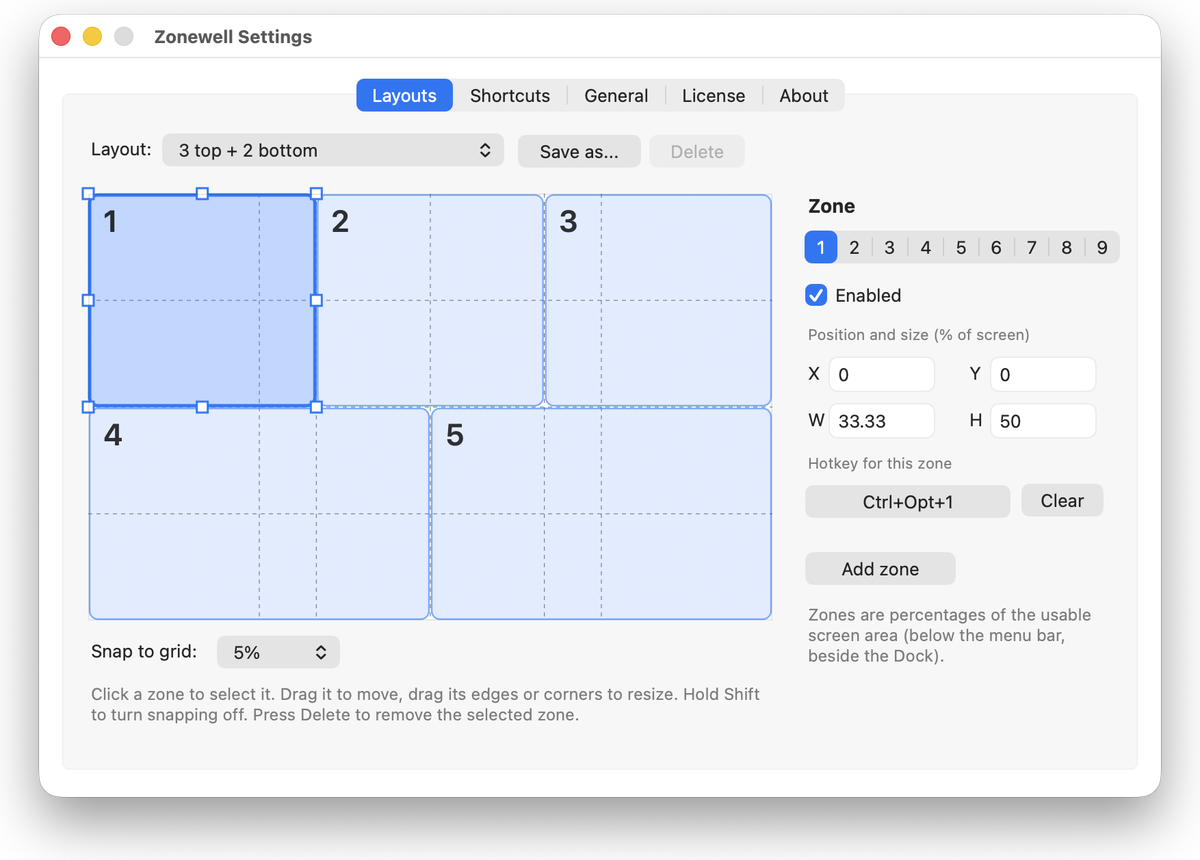
Download free trial Buy for A$14.99Design your layout on a live preview
Drag zones to move them, pull the edges to resize, and give each zone its own shortcut.
Everything you need, nothing you don't
Built to stay out of your way until you want a tidy desktop.
Design your own zones
Drag and resize zones on a live preview of your screen. Up to 9 zones, with snapping to thirds, quarters and each other.
Drag to snap
Hold a key while you drag a window and the zones appear. Let go over a zone and the window snaps in. Optional edge and corner snapping too.
Shortcuts for everything
Every zone has its own global shortcut, plus halves, maximize, center and restore. Change any of them.
Arrange all windows
One shortcut sends your front windows into your zones in order. A tidy desk in a single keystroke.
Saved layouts
Start from nine ready-made layouts, tweak them, and save your own. Switch layouts from the menu bar.
Multiple displays
Zones follow the screen a window is on. Throw a window to the next display and keep its proportions.
Gaps and margins
Add breathing room between windows and around the screen edge. Zones and previews match exactly.
Ignore list
Tell Zonewell to leave certain apps alone, so video calls and games stay exactly where you put them.
Private by design
No analytics and no account. Your layouts stay on your Mac.
How it works
Two minutes from download to a tidy screen.
Install and allow
Open Zonewell and switch it on under Privacy & Security > Accessibility. macOS asks for this so apps can move other windows.
Pick or draw a layout
Start with a preset, or open Settings and drag zones until the preview looks right.
Snap
Press a shortcut, or hold Shift and drag a window to a zone.
Simple pricing
Try it free for 14 days. Pay once if you keep it.
- Use on up to 3 of your Macs
- Free updates for all 1.x versions
- 30-day money-back guarantee
- No subscription, no account
Questions
Which Macs and macOS versions are supported?
macOS 13 Ventura or later, on Apple silicon and Intel Macs.
Why does Zonewell need Accessibility permission?
macOS only allows an app to move and resize other apps' windows after you grant Accessibility access. Zonewell uses it for exactly that and nothing else. It does not read the contents of your windows.
What happens after the 14-day trial?
Zonewell stops snapping until you enter a license key. Your layouts and settings are kept.
Can I use it on more than one Mac?
Yes, one license covers up to 3 of your Macs. You can deactivate a Mac in Settings to move your license elsewhere.
Does it work with macOS's built-in window tiling?
They can be used side by side. If you use Zonewell's edge snapping, turn off macOS edge tiling in System Settings > Desktop & Dock to avoid double snapping.
Does Zonewell collect any data?
No analytics or usage data. It contacts the internet only to activate and re-check your license and to look for updates. See the Privacy section below.
How do I uninstall it?
Quit Zonewell from the menu bar icon, then drag it from Applications to the Trash.
I need help.
Email contact@antomictech.com.
Privacy, terms and refunds
Privacy
Zonewell does not collect analytics, usage data or personal information. Your layouts and settings are stored on your Mac. The app contacts the internet only to (1) activate and periodically re-check your license key with our payment and licensing provider, Lemon Squeezy, and (2) check this website for new versions. When you buy, Lemon Squeezy acts as the merchant of record and handles payment details and your purchase email under its own privacy policy. We receive your name and email for support and licensing.
Terms of use
Zonewell is licensed, not sold. A license lets you install and use Zonewell on up to 3 Macs that you own or control, for personal or business use. You may not copy, resell, redistribute, reverse engineer or share your license key, except as the law allows. Zonewell is provided as is; to the extent permitted by law we are not liable for indirect or consequential loss. Nothing in these terms excludes any consumer guarantee that cannot be excluded under the Australian Consumer Law. These terms are governed by the laws of Victoria, Australia.
Refunds
If Zonewell is not right for you, email contact@antomictech.com within 30 days of purchase for a full refund.